End-to-end ERP management

Is your management still running in pieces?

Finnegans GO connects your whole operation so you can work with more clarity and make better decisions.

  • ARSAT
  • Molinos
  • Luzu
  • Arcor
  • Alparamis
  • Syngenta

+7000 companies trust us

movil finnegans
Finnegans GO on desktop, tablet and mobile

Features

Everything you need to organise and grow your operation

  • Purchasing

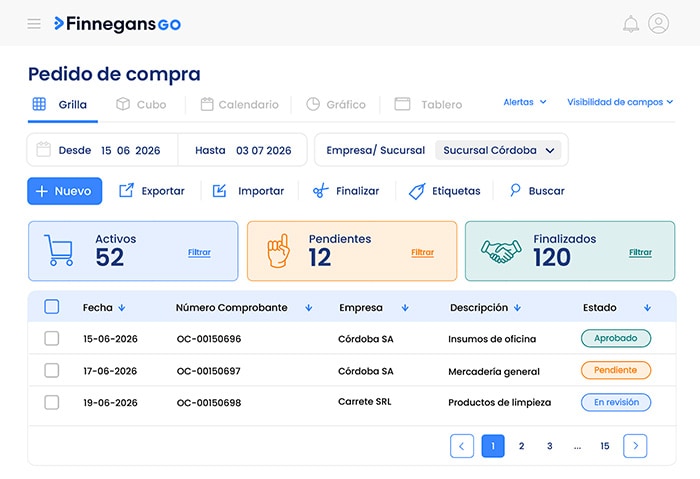
    • Create requests and purchase orders

      Import information, record new operations and complete processes from a single view.

    • Choose how to see the information

      Review each operation as a grid, calendar, chart, cube or dashboard depending on what you need to analyse.

    • Track every operation

      Filter by date, company or branch; use labels, alerts and visible fields to organise the follow-up.

    Purchasing
  • Sales

    • Manage dispatches

      Review the transactions linked to the shipping and follow-up of commercial operations.

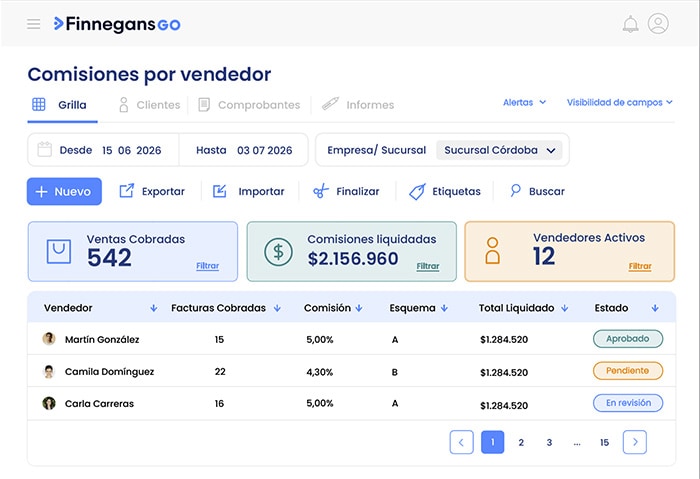
    • Analyse commissions

      Check collected sales, schemes and amounts settled per salesperson.

    • Connect every stage of the sale

      Review the information tied to dispatches, customers, receipts and commercial reports.

    Sales
  • Inventory

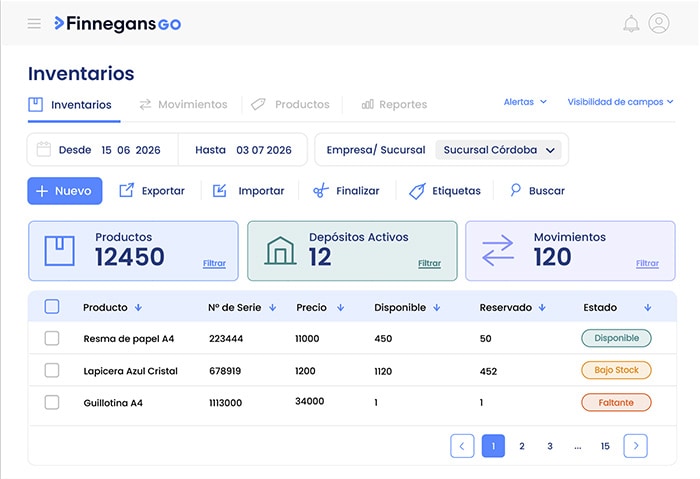
    • Check availability and reservations

      See the available and reserved stock per product to know the current state of your inventory.

    • Organise information by warehouse

      Access the detail by warehouse, product and code to locate every record within the inventory.

    • Review movements for the period

      Filter by date, warehouse or product to analyse the recorded movements.

    Inventory
  • Budgets

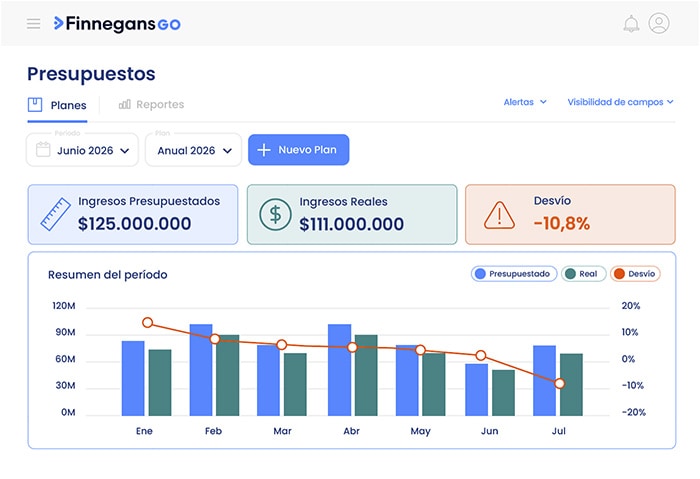
    • Plan income, expenses and results

      Create plans per period and project the information you need to organise your management.

    • Compare budget against actuals

      Check control reports to spot deviations in quantity and amount as the year progresses.

    • Update your projections

      Edit the plans and recalculate the information to adjust decisions, forecast and cash flow.

    Budgets
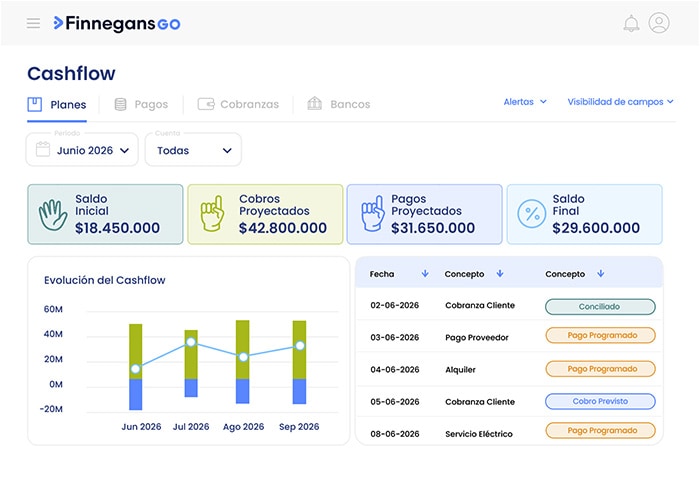
  • Treasury

    • Project your cash flow

      Anticipate payments, collections and due dates for every period.

    • Manage payments and collections

      Check current accounts, record movements and organise pending operations.

    • Reconcile banks with more control

      Compare statements and movements to follow balances and spot differences.

    Treasury
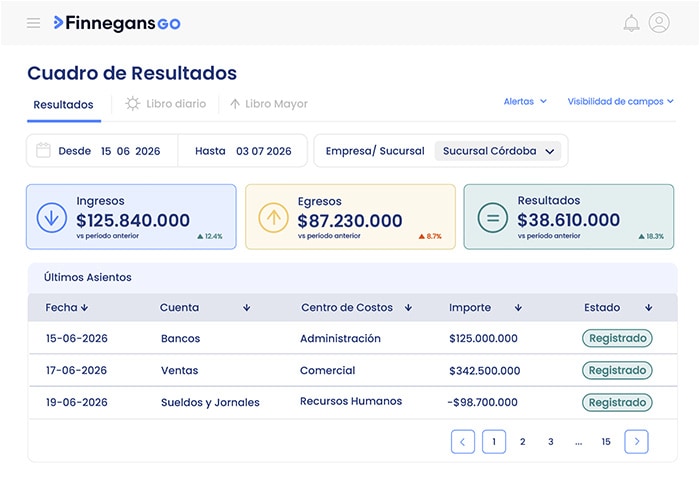
  • Accounting

    • Record accounting entries

      Create generic entries and organise the information per period to keep your books up to date.

    • Check key ledgers and reports

      Access the Journal, General Ledger and Income Statement from a single place.

    • Organise accounts and cost centres

      Manage accounts, currencies and cost centres to follow every movement more clearly.

    Accounting
Talk to a specialist

Your industry has its own challenges

See how Finnegans GO adapts to the processes, pace and needs of your business.

Don’t see your industry?

No worries — we have solutions for operations of every kind

Get in touch with us
Applications

Your management can expand

Add applications to customise Finnegans, connect new channels and solve specific needs of your operation.

  • Deals

    Connect applications and automate data exchange with Finnegans.

  • App Builder

    Build custom applications and flows to extend Finnegans to your business needs.

  • Nexus

    Bring your operation to the phone and handle ERP tasks quickly, from sales to forms.

  • BModeler

    Design forms and processes to automate internal workflows.

  • Data Warehouse

    Make your business information available in BI tools to analyse data and build reports.

  • Purchasing Agent

    Record and validate purchase invoices in the ERP from AFIP and other sources.

  • Construction Agent

    Record site operations by chat or voice and speed up field work.

  • Grain Agent

    Automate the reception, validation and recording of grain documentation in the ERP.

  • Treasury Agent

    Connect your banks and automate the recording and reconciliation of movements.

  • Customer Portal

    Let your customers browse products, place orders and follow their status.

  • Supplier Portal

    Bring your suppliers in to upload invoices and speed up the purchasing process.

  • Mercado Libre

    Integrate Mercado Libre sales, customers, prices and stock with your ERP.

  • Tienda Nube

    Integrate orders, customers and stock from your online store straight into the ERP.

  • Matba

    Record futures operations, check quotes and analyse your positions.

  • Finnapp Office

    Manage petty cash from your phone: upload receipts and approve expenses instantly.

  • Finnapp Agro

    Take farming and livestock management to your phone, even offline: tasks, plots, stock and harvest.

  • Agrology

    Connect with producers, compare production data and access certifications.

  • Backups

    Generate automatic or manual backups of your database.

  • Flour Delivery Note

    Record, validate and manage electronic flour delivery notes linked to ARCA.

  • Case Portal

    Report questions, incidents and requests, and follow every case in one place.

  • Self-service Portal

    Let employees check and sign their payslips online.

  • Leases App

    Manage lease contracts, instalments, settlements and invoicing in multiple currencies.

  • Intercompany App

    Sync operations between companies of the same group automatically.

  • Grain Portal

    Give producers easy access to balances, documentation and key information.

Talk to a specialist

Finni

Every solution is powered by our AI

Designed to free your team from routine work, drive their professional growth and build new skills that take them further.

Implementation and evolution

Choose how to get Finnegans GO up and running

  • Choose the implementation option according to the complexity of your operation and the support you need.

    OptionDescriptionIdeal for
    Option and features
    • DAI Start

      DAI Start

      Get Finnegans GO adapted to your industry and move at your own pace with courses, tracking tools and moderated Q&A spaces. Free of charge.

      Small companies looking for a quick start.

      Up to 5 users
    • DAI Full

      DAI Full

      Implement Finnegans GO with a work plan, live training and personalised follow-up. Adapt it to your business needs.

      SMEs with large structures and/or complex processes.

      Unlimited users
    • One Team

      One Team

      A project leader and a team of specialists build a tailor-made solution with dedicated support.

      Medium and large companies with robust structures and complex processes.

      Unlimited users
  • With our platform open to third-party code, you get more flexibility through extensive 'No-Code', 'Low-Code' and 'Full-Code' tools and features.

    OptionFeaturesProgramming knowledge
    Option and features
    • No code

      No code

      Adapt your Finnegans GO software without writing code. Configure everything from buttons to specific actions.

      None

    • Low code

      Low code

      Change rules and behaviours configured in your software with basic tools such as Excel.

      Basic

    • Guest code

      Guest code

      Extendable code and an open platform so your team can use every tool built into the software and add any external ones they want.

      Advanced

    • Developers

      Connect Finnegans GO with your systems through APIs and developer tools.

      Specialised

  • Once Finnegans GO is up and running, keep learning, improving processes and finding new ways to grow your management.

    Option and features

    imas

    A service of
    enhanced intelligence
    Imagen Imas

    Sessions where we connect organisations and specialists to:

    • Understand real challenges

    • Discover new ways to use your system

    • Activate concrete improvements for each operation

    I want to join
    Imagen Imas

    Academia

    Courses, training and resources so your team can learn, adopt new tools and get more out of Finnegans GO.

Want to see how Finnegans GO adapts to your operation?

Book a demo

Frequently asked questions

  • Check our Knowledge Base, where you will find all the documentation about the system, along with guides, videos and solutions to common problems. No account needed. To learn more, follow this link.

    If you are already a customer you can chat with our experts online through our platform or ask us to call you and we will get in touch right away.

  • Finnegans reports let you analyse the information of every transaction recorded in the system. You can view reports as a grid, cube, chart or dashboard. Depending on the view you choose and how you configure it, you can set the formats that best fit your needs.

  • To estimate the implementation time, one of our consultants needs to survey the organisation first. We understand that every company is a different universe, with its own people, processes and needs.

  • Check our Knowledge Base, where you will find all the documentation about the system, along with guides, videos and solutions to common problems. No account needed. To learn more, follow this link.

    If you are already a customer you can chat with our experts online through our platform or ask us to call you and we will get in touch right away.

  • There is no problem at all: the data always belongs to the customer. If at some point the organisation decides to cancel, for whatever reason, the information is exported so the customer can migrate easily. Once the account is closed, nobody — neither at Finnegans nor at the customer’s organisation — can access the database again.

About

Finnegans

We are a software company focused on delivering comprehensive technology solutions for business management.

Our mission is to level the playing field, making technological innovation accessible to companies of every size so they can manage with the same efficiency, intelligence and quality as global leaders.

Industries we work with

  • +70kusers
  • +7kcompanies
  • +15countries
  • +33years